
Appearance
CryptoComply Address Screening
1. Overview
CryptoComply enables organizations to screen blockchain addresses (e.g., wallets, LPs, smart contracts, etc) for sanctions, illicit activity, and exposure risk.
It provides automated ongoing monitoring, clear visual risk breakdowns, and an auditable workflow for compliance teams.
When you register a blockchain address, CryptoComply immediately analyzes sanctions and on-chain data to:
- Identify the entity or service behind the address
- Assess exposure to risky counterparties or illicit categories
- Assign a Risk Level (Low / Medium / High / Severe)
Blockchain-address screening runs through Chainalysis and TRM. When you screen the person or entity that owns an address, that watchlist screening runs through World-Check.
Ongoing screenings can be scheduled to occur automatically, and alerts notify you of any change in risk or new exposure.
2. Access and Navigation
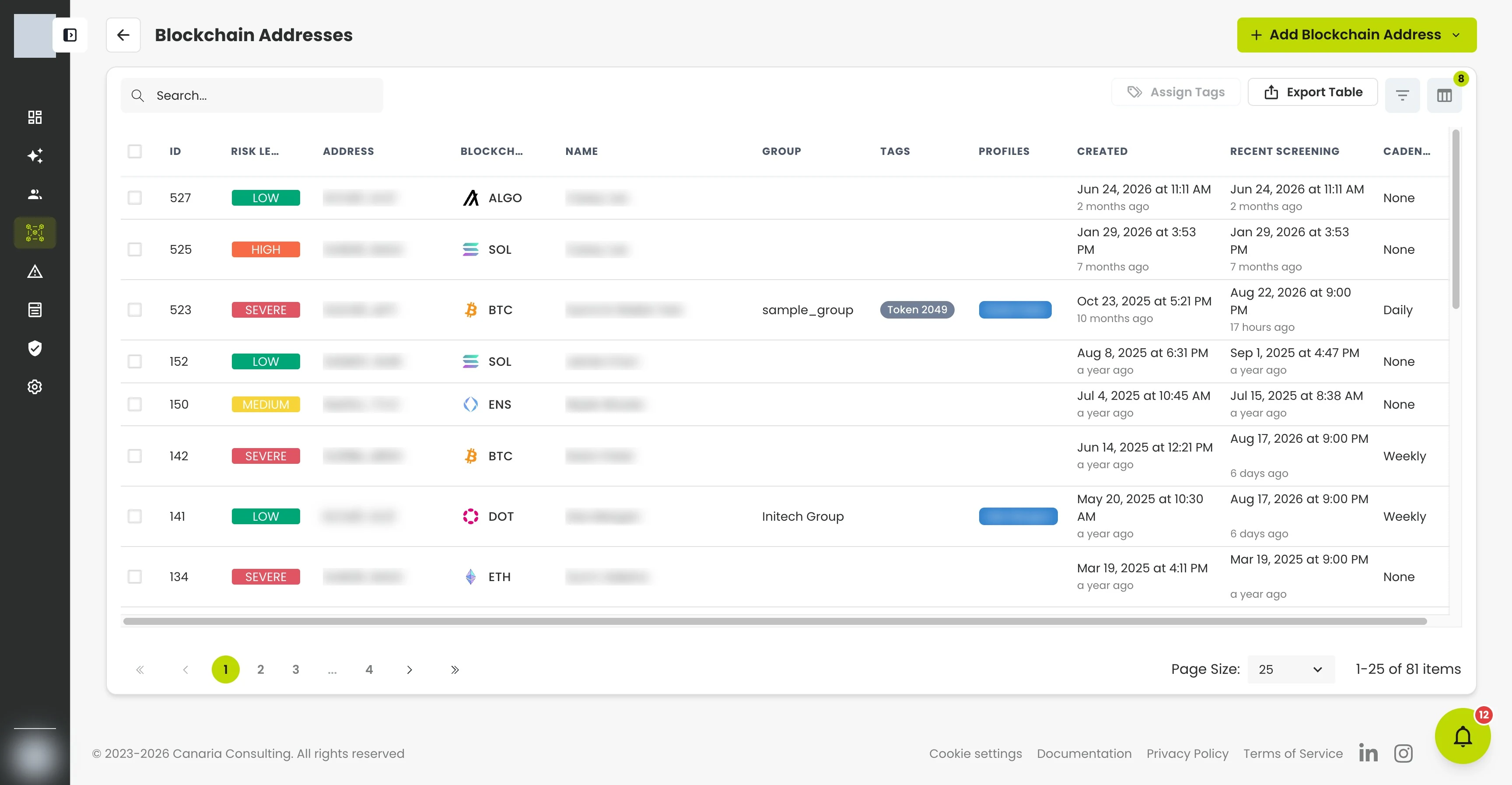
Blockchain Addresses Section
- Go to Blockchain Addresses from the left sidebar.
- View all registered blockchain addresses in a table with:
- ID
- Risk Level
- Address
- Blockchain
- Name
- Tags
- Initial and Recent Screening dates
- Cadence (None, Daily, Weekly, Monthly, Quarterly or Yearly)
- Use the search bar or column filters to find specific blockchain addresses. You can filter by Tags to narrow the table to addresses matching a specific label, for example, viewing only addresses tagged as "Vault" or "Wallet."
Actions available:
- Register New Blockchain Address: add and screen a new address.
- Bulk Assign Tags: apply one or more tags to multiple selected addresses at once.
- Export Selected Rows: download the selected table data exactly as displayed, useful for recordkeeping or audit exports.
3. Adding and Screening a Blockchain Address
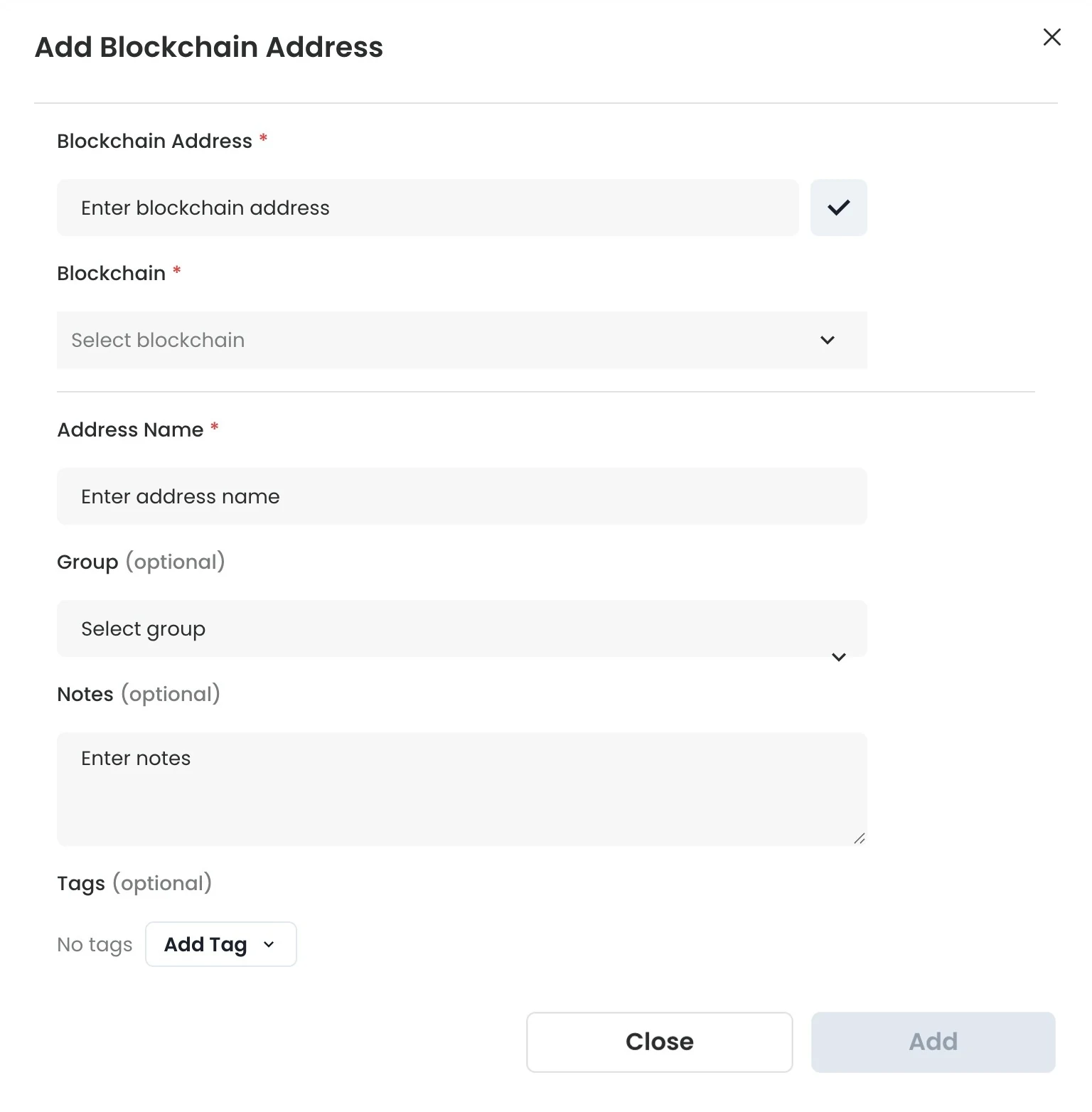
- Click Register New Blockchain Address.
- Fill out the form:
- Blockchain Address (required)
- Blockchain (required)
- Address Name (required)
- Group (optional)
- Notes (optional)
- Click Add.
Once submitted, the blockchain address is automatically screened and redirected to its Address Screening page.
Groups
Like profiles, every blockchain address can belong to a Group. The group drives the address's risk thresholds and screening schedule, so addresses governed by the same group are held to the same standards.
- Adding an address on its own: choose its group in the form. If your organization has only one group, it is selected automatically. Choosing a group is optional — you can save an address without one, and you can clear a previously assigned group back to none from the address Overview.
- Adding an address from within a profile: the address automatically inherits that profile's group.
The group appears as an editable, linked row in the address Overview, with a link to the group's settings. Change it the same way you edit any other overview field.
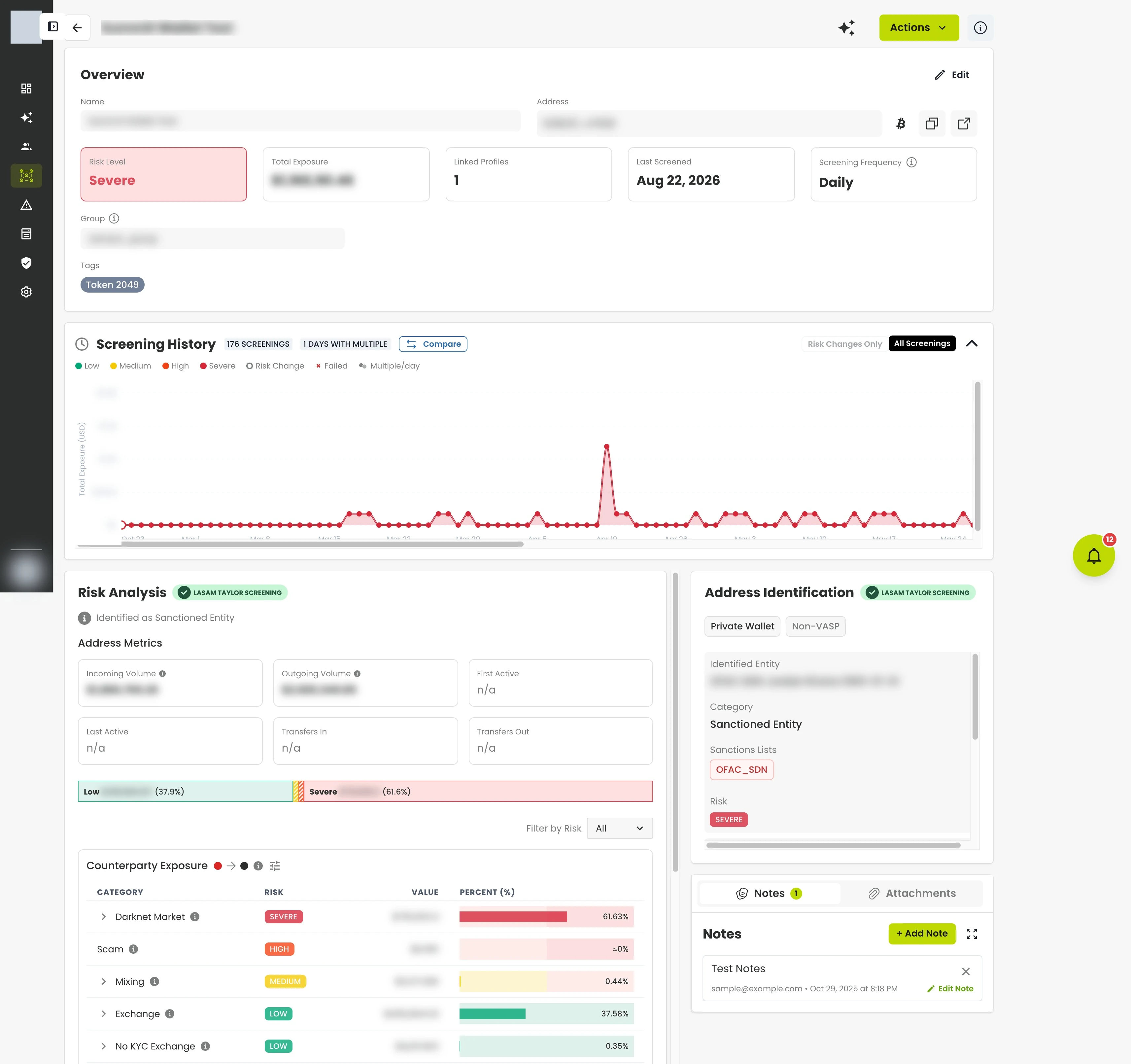
Blockchain Address Screening Page
The Address Screening page displays:
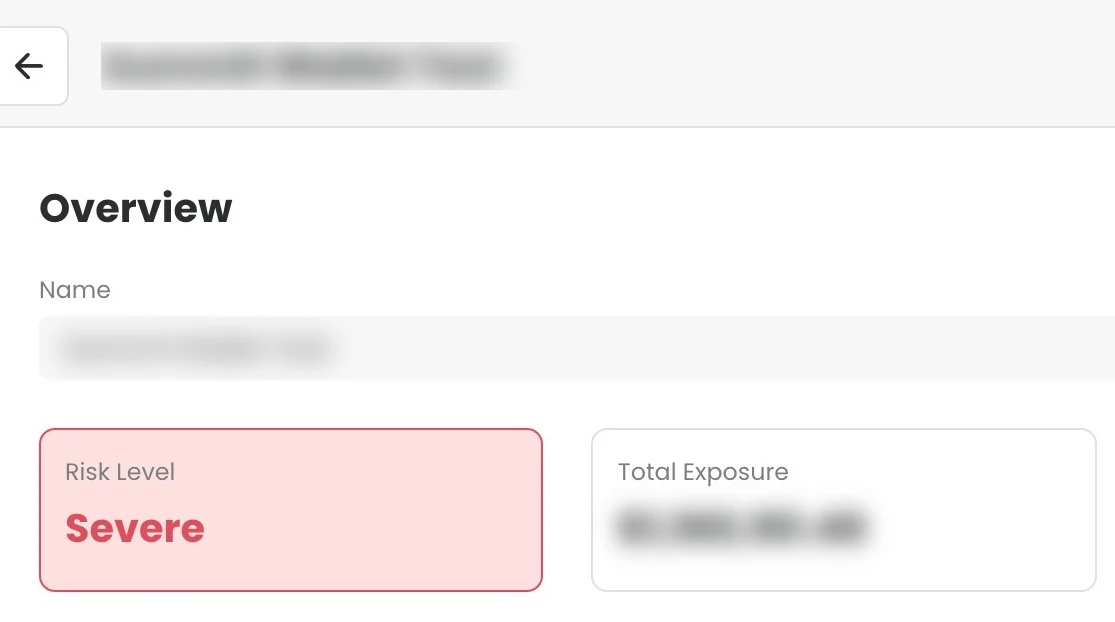
- Overview Bar: Address, Blockchain, Risk Level, Total Exposure, Group, Linked Profiles, Last Screened, and Screening Frequency
- Tags: label and categorize the address directly from the overview
- Risk Analysis: visual breakdown of Counterparty and Indirect Exposure by category, with risk level, USD value, and percentage, plus an Address Metrics section and a plain-language risk reason
- Address Identification: entity match and classification (e.g., Sanctioned Entity, Exchange, Service), with address-type and VASP classification chips and sanctions-list badges
- Counterparties: the named entities the address transacted with, ranked most-material-first
- Attachments: upload and classify supporting documents for the address
- Notes Panel: add internal notes or comments, time-stamped and user-attributed
- Actions Menu: includes Generate Report
- Screening History: a timeline graph of all past screenings showing risk level changes over time
- Screening Frequency: set directly from the overview to define how often the address is automatically re-screened
Tags
Tags allow you to label and categorize blockchain addresses for easier organization and filtering. You can use tags to group addresses by type, purpose, or any custom classification relevant to your workflow.
Default Tags
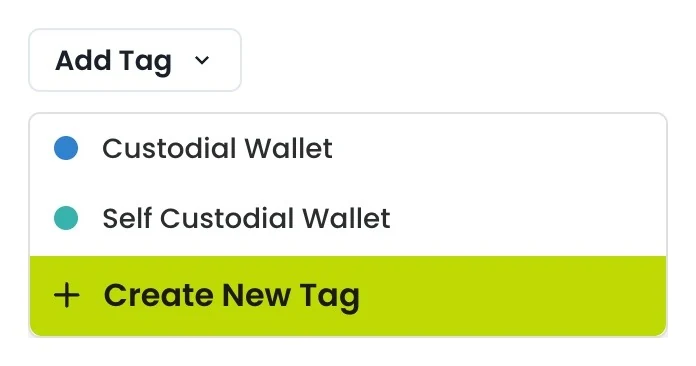
CryptoComply includes a set of default tags you can apply immediately: Liquidity Pool, Vault, and Wallet. These cover common address types encountered during blockchain screening.
Creating Custom Tags
If the default tags don't fit your needs, you can create your own. From the Address Screening page, click + Add Tag, then select + Create New Tag at the bottom of the dropdown. Custom tags are available across all blockchain addresses once created.
Applying Tags
To tag an address, open its Address Screening page and click + Add Tag in the Overview section. Select one or more tags from the dropdown, or create a new one. You can remove a tag by clicking the × next to it. An address can have multiple tags applied simultaneously.
4. Understanding Risk and Exposure
CryptoComply evaluates both Direct Exposure and Indirect Exposure to entities on the blockchain. This methodology analyzes the flow of funds in and out of the blockchain address to determine links to risky counterparties.
Address Identification
The address is attributed to a known or unknown entity based on behavioral and transactional clustering. Examples: Exchange, OTC desk, Dark Web Market, Mixing, or unnamed clusters showing service-like behavior.
This section also carries classification chips for the address — its address type (e.g., private wallet, service provider) and, where applicable, a VASP (Virtual Asset Service Provider) chip — each with an explanatory tooltip. When a listed party is identified, its sanctions-list badges appear here too (see Sanctions-list attribution below).
When the person or entity that owns the address is screened against the watchlist, a hit can include a match explanation — the exact list term that matched (flagged when it was an alias, or AKA (Also Known As), rather than the primary name) and a field-by-field verdict (for example, "Name matched, Date of Birth did not match"). This helps you judge whether an ownership match is a true hit before it drives the address's risk.
Address Metrics
The Risk Analysis panel includes an Address Metrics section summarizing the address's on-chain activity:
- Incoming and outgoing attributed-exposure value, in USD
- First active and last active dates
- Transfers in and transfers out counts
A metric the vendor does not provide reads as n/a, which is distinct from a real 0.
Risk Reason
Alongside the exposure breakdown, CryptoComply shows a plain-language risk reason — a short, human-readable explanation of why the address received its current risk level.
Sanctions-list Attribution
When a flagged party is designated by an official sanctions list, CryptoComply shows which list, as badges on the relevant sanctions-category exposure rows, on the address's identified associations, and on named counterparties. List codes map to readable names — for example, OFAC SDN, OFAC Sectoral, UK OFSI, EU consolidated, UN Security Council, and Israel NBCTF; a code CryptoComply cannot map is shown verbatim.
A designated entity is flagged even when it appears under a non-sanctions category (for example, an OFSI-listed exchange). If a sanctions match arrives with no identifiable list, it is shown as a distinct "Review required" state — meaning "sanctions match, list unknown" — and is treated as a manual-review signal, never as clean.
Counterparties
The Counterparties table lists the named entities the address has transacted with, ordered most-material-first. Each row shows the counterparty's per-direction (sent/received) USD amounts and its own sanctions badges. A flagged counterparty is highlighted regardless of its category. When the list is long, CryptoComply notes that only the top entries are shown.
Exposure Types
- Ownership Exposure: risk associated with the address itself (e.g., directly sanctioned or flagged).
- Counterparty Exposure: immediate, one-hop risk from direct transactions.
- Indirect Exposure: multi-hop risk where funds link through intermediaries to high-risk entities.
Risk Categories
Each exposure is grouped into categories such as:
- Sanctioned Entity / Jurisdiction
- Dark Web Market
- Scam / Fraud Shop
- Mixing / Protocol Privacy
- Exchanges
- Institutional Platforms
- Unnamed Service
Each category row includes:
- Risk level
- USD value
- Percentage of total exposure
The combination of Direct and Indirect Exposure drives the blockchain address's final Risk Level.
5. Ongoing Monitoring and Alerts
Screening Frequency
Screening Frequency is displayed and managed directly from the Overview section of each blockchain address. You can set it to:
- None: no automatic re-screening
- Daily: re-screen once every day
- Weekly: re-screen once every week
- Monthly: re-screen once every month
- Quarterly: re-screen once every three months
- Yearly: re-screen once every twelve months
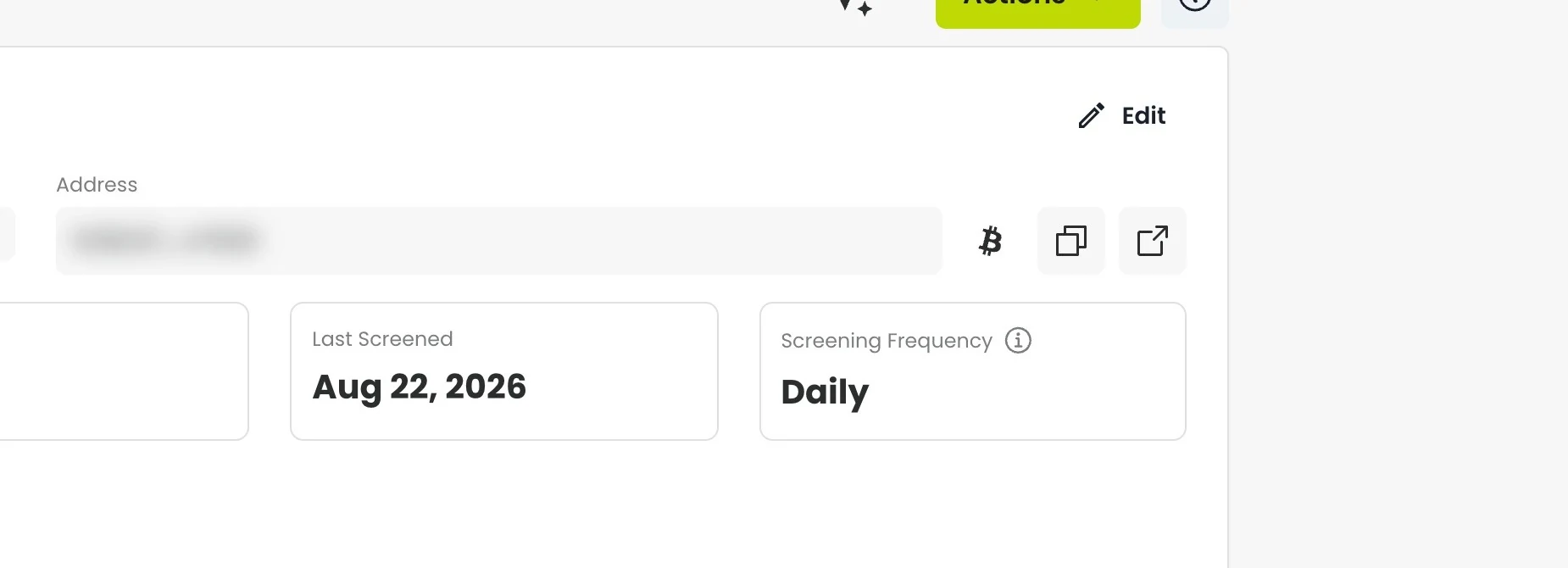
When enabled, CryptoComply automatically re-screens blockchain addresses and creates alerts for any risk level changes.
For weekly, monthly, quarterly, and yearly frequencies, CryptoComply uses the blockchain address's initial screening date as the reference point. Each subsequent re-screening occurs after the defined interval has elapsed since that initial date, not from the start of the calendar week, month, or quarter.
Screening History
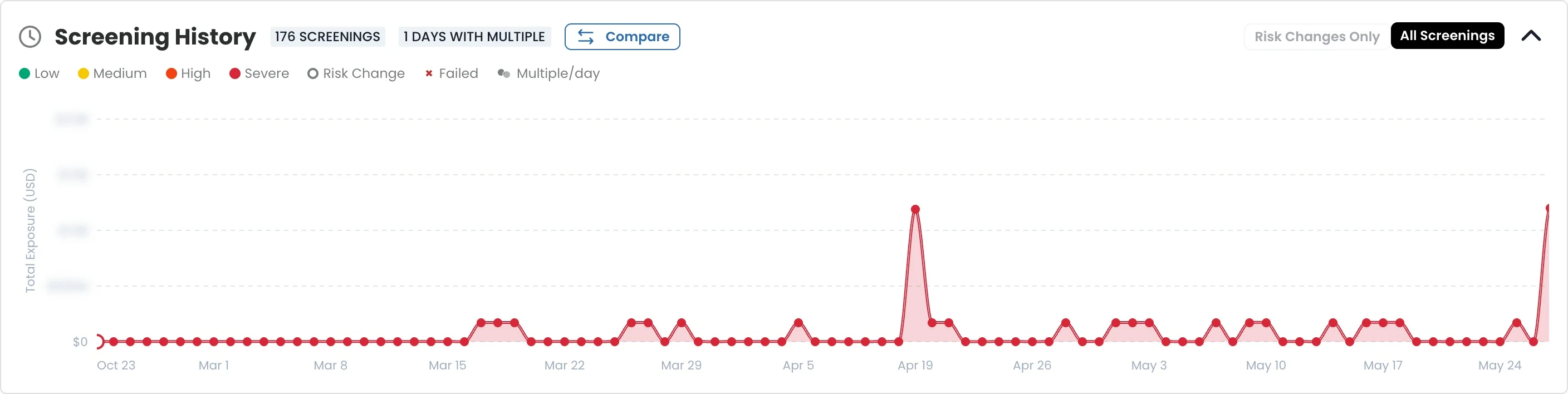
Each blockchain address includes a Screening History section showing a timeline graph of all past screenings. The graph displays risk level changes over time, with color-coded data points for Low, Medium, High, and Severe risk levels.
You can filter the history to show only Risk Changes or view All Screenings. The history also flags days with multiple screenings.
Comparing Screening Results
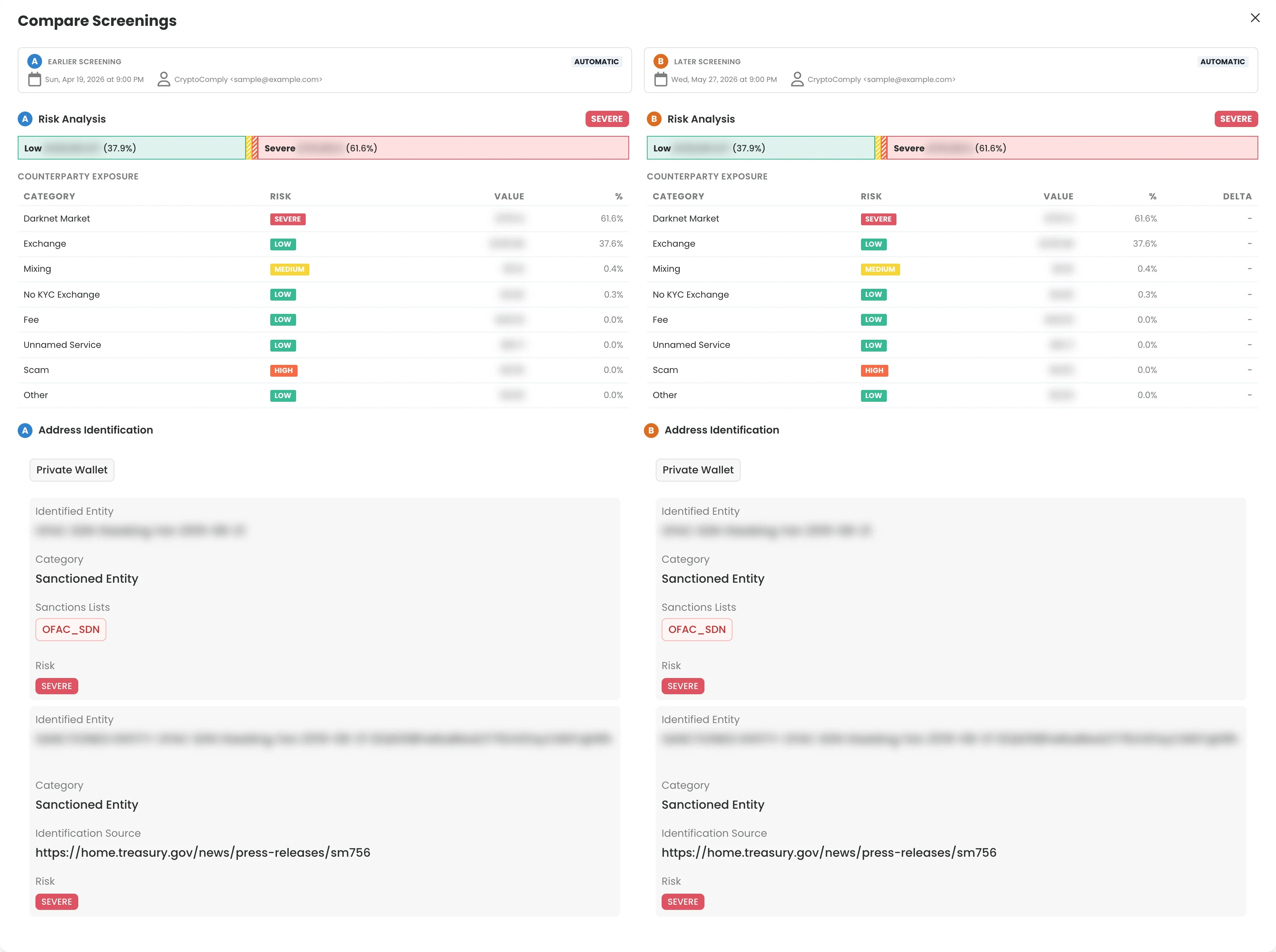
Use the Compare button in the Screening History section to compare two screenings side by side. The comparison view shows:
- Risk Analysis for both screenings with delta values showing changes in exposure by category
- Address Identification for both screenings, including each side's classification chips, risk reason, and sanctions-list badges on exposures and associations
- A counterparties diff — per-entity totals across the two screenings, with added and removed rows and a signed delta
- Timestamps and whether the screening was manual or automatic
This is useful for tracking how risk exposure has evolved over time and documenting changes for audit purposes.
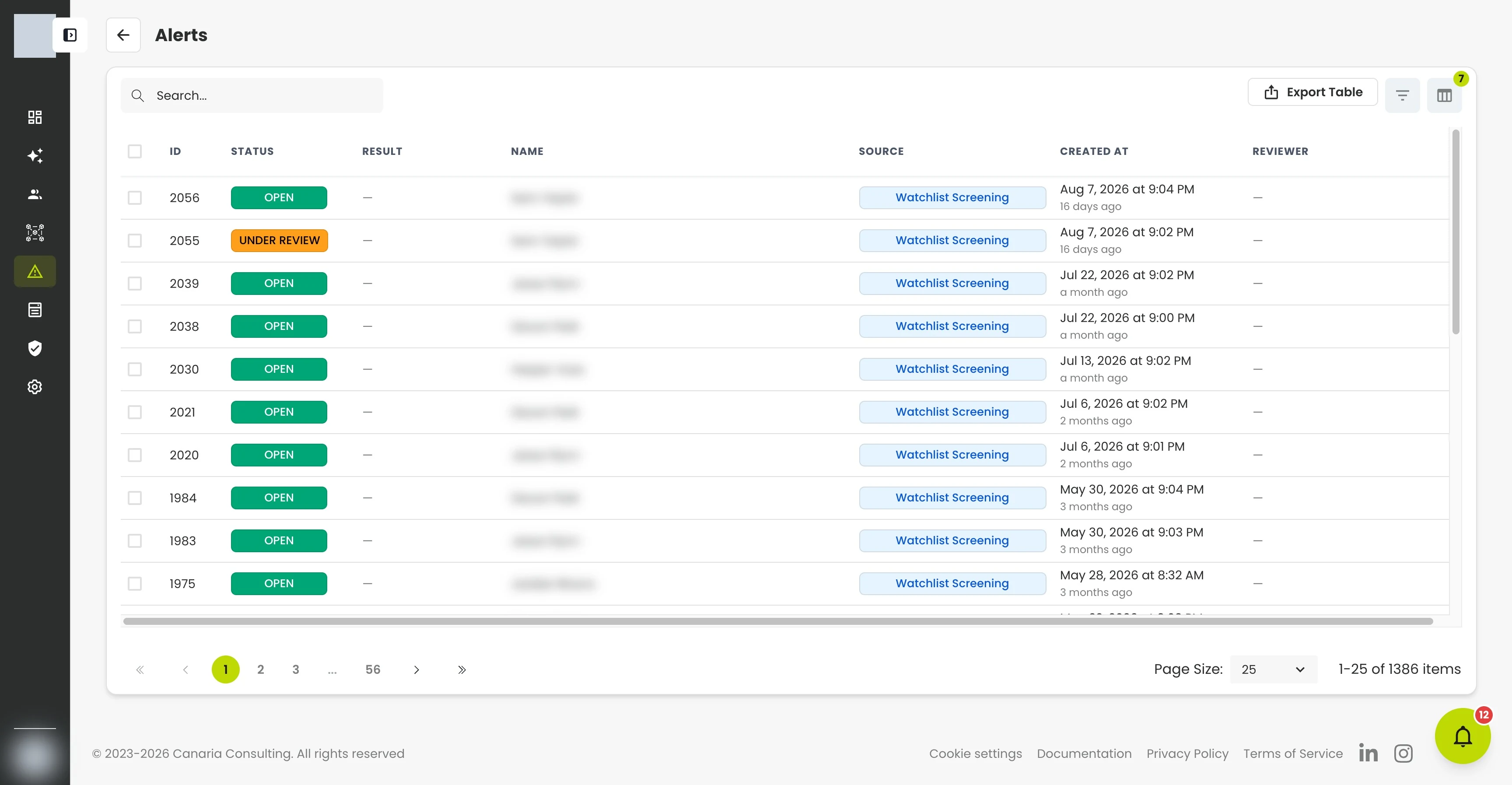
Alerts
Alerts are generated when:
- The blockchain address' overall risk level changes
- A previously clean address develops new exposure
Alerts include:
- Alert ID
- Status (Open, Under Review, Escalated, Closed)
- Blockchain Address Name
- Source (Blockchain Address or Watchlist Screening)
- Previous and New Risk Levels
- Created Date / Assigned To
Alerts are also sent via email with a direct link to the alert page.
6. Collaboration and Case Management
Notes
Analysts can add notes to blockchain addresses and alerts for:
- Investigation summaries
- Analyst reviews
- Final decisions or escalation notes
Notes are time-stamped and user-attributed for audit purposes.
Attachments
Each blockchain address has its own Attachments section, just like a profile. Use it to keep supporting evidence with the address — for example, a screening report, a wallet's transaction detail, or ownership verification.
- Upload PDFs or images.
- Classify each attachment by type: Screening Report, Transaction Record, Ownership Verification, or Other.
- Add notes on any attachment, which can be edited later.
Each attachment records its provenance — who uploaded it and how it reached the platform. Uploading, editing, deleting, and note-taking are each governed by your role's permissions, and every change is recorded in the address's audit trail.
Assignments
Alerts can be assigned to team members for investigation.
Reports
Use the Generate Report option under Actions to generate a detailed, timestamped PDF report of:
- Address identification, including classification and risk reason
- Exposure analysis, with sanctions-list badges and address metrics
- The counterparties table
- Notes and history
7. Analyst Workflow (Recommended)
- Add Blockchain Address → run initial screening.
- Review Exposure Breakdown
- Document Findings → add notes or disposition.
- Set Cadence → enable automatic re-screening.
- Monitor Alerts → review and close or escalate as needed.
8. Interpreting Common Patterns
| Pattern | Interpretation |
|---|---|
| Sanctioned Entity / Jurisdiction + High Direct Exposure | Severe risk: immediate match or high exposure. |
| High Indirect Exposure (Darknet/Mixing) | High/Medium: depends on policy thresholds. |
| Exchange / Institutional Platform Exposure | Low: regulated or low-risk source. |
| Unnamed Service | Treat with caution; behavior suggests a service, identity unresolved. |
9. Exporting Data
The Export Selected Rows button in the Blockchain Address view allows you to download the data currently displayed in the table. This export is useful for:
- Internal compliance reports
- Audit documentation
- Offline recordkeeping
No additional or hidden fields are included — the export matches what you see on-screen.
10. Reports and Evidence
Each blockchain address includes an Actions → Generate Report option. Reports contain:
- Blockchain Address overview and metadata
- Risk breakdown, risk reason, and address classification
- Address metrics and the counterparties table
- Sanctions-list attribution badges
- Notes and decisions
- Timestamps and user information
These fields mirror what you see on the Address Screening page, so the report is a faithful, point-in-time record of the screening.
These reports can be attached to case files or shared with auditors/regulators.
11. Troubleshooting
| Issue | Possible Cause | Resolution |
|---|---|---|
| Invalid address | Typos or wrong chain format | Re-enter full address, confirm blockchain |
| No exposure displayed | New or inactive blockchain address | Re-screen after 24-48h |
| Excessive alerts | Cadence too frequent | Adjust screening frequency |
| False positive sanctions hit | Common name or clustering overlap | Review entity, document disposition, close if verified clean |
12. Glossary of Terms and Categories
Exposure and Risk Concepts
| Term | Definition |
|---|---|
| Exposure | The relationship between the screened address and other entities, determined by fund flows into and out of the address. |
| Ownership Exposure | Risk associated with the screened blockchain address itself, including its own flags. |
| Counterparty Exposure | Direct (first-degree) transactions between the screened blockchain address and another entity. |
| Direct Exposure | Immediate risk from direct transactions with another entity or service. |
| Indirect Exposure | Multi-hop exposure linking the blockchain address to risky entities through intermediaries. |
Entity and Service Types
| Term | Definition |
|---|---|
| ATM | Services converting cash to/from cryptocurrency, sometimes exploited for laundering due to weak KYC. |
| Bridge | Protocols connecting blockchains to allow cross-chain transfers and interoperability. |
| Exchange | Services for buying/selling/trading crypto; generally low-risk if regulated. |
| Hosted Wallet | Custodial wallets managed by a provider; user does not control private keys. |
| P2P Exchange | Peer-to-peer trading sites facilitating direct swaps between individuals. |
| VASP | Virtual Asset Service Provider — a regulated intermediary (e.g., exchange, custodian) that handles crypto on behalf of users. |
| Lending | Platforms facilitating borrowing/lending of crypto (centralized or decentralized). |
| Merchant Services | Payment processors allowing merchants to accept crypto payments. |
| Mining / Mining Pool | Coin generation or collective mining resource services. |
| NFT Platform / Collection | Marketplaces for buying and selling NFTs. |
| No-KYC Exchange | Exchanges lacking meaningful identity verification. |
| Unnamed Service | Unidentified clusters behaving like known services; identity unresolved. |
Illicit / High-Risk Categories
| Term | Definition |
|---|---|
| Child Abuse Material | Dark web platforms facilitating child exploitation content. |
| Dark Web Market | Illicit marketplaces selling illegal goods or services using cryptocurrency. |
| Fraud Shop | Stores selling stolen data, PII, or accounts for profit. |
| Gambling | Crypto-based betting platforms, often under weak regulation. |
| ICO | Fundraising mechanism issuing new tokens; some are fraudulent. |
| Illicit Actor / Org | Individuals or groups engaged in illegal activity on-chain. |
| Malware | Malicious software used to compromise systems or steal data. |
| Mixing | Tools obscuring transaction origins by pooling and redistributing funds. |
| Protocol Privacy | Privacy-enhancing technologies like zero-knowledge proofs or stealth addresses. |
| Ransomware | Malware that encrypts data and demands payment for decryption. |
| Sanctioned Entity | Entity listed on official sanctions lists (e.g., OFAC, UN, EU). |
| Sanctioned Jurisdiction | Entities based in countries under comprehensive sanctions. |
| Scam | Fraudulent schemes offering fake investments or services. |
| Special Measures | Entities flagged by authorities (e.g., FinCEN 311) under anti-money laundering provisions. |
| Stolen Funds | Crypto stolen via hacks or system breaches. |
| Terrorist Financing | Funding linked to designated terrorist entities or individuals. |
Technical and Other Terms
| Term | Definition |
|---|---|
| Dust | Tiny, residual crypto balances below transaction thresholds. |
| Fee | Small crypto portions paid to miners or stakers for validation. |
| Infrastructure as a Service | Entities providing cyber infrastructure (e.g., VPNs, VPS) potentially used for illicit hosting. |
| Online Pharmacy | Entities selling drugs/chemicals without prescriptions or credentials. |
| Org | Custom clusters grouped under a shared name in CryptoComply. |
| Smart Contract / Token Smart Contract | Blockchain code automating agreements or representing tokenized assets. |
| Unspent | Funds held in balance, not yet transacted. |
| Untraced | Temporary category for flows not yet fully traced or attributed. |